Sunday, 23 November 2014


Saturday, 22 November 2014

The SSL Certificate and Your Website’s Security

SSL Certificate and Website Security
When you are surfing the internet, a lot of information is being exchanged between the web host and the device being used to surf the internet. This type of information can always be easily breached by hackers, especially if it involves online transactions and this has always been a major issue when dealing with the internet. Nowadays, cases of online theft are becoming increasingly popular. There is one way of determining whether a site is safe to use through an SSL Certificate which is powered by the beauty of cryptography.

How SSL Cryptography Works?

Cryptography ensures that data is transmitted in a means that only the intended party can access it. You can easily determine a site which has an SSL certificate by the padlock icon that is displayed beside the web address. So how do SSL certificates work? SSL in full is Secure Sockets Layer. An SSL certificate provides tight security during the exchange of data.
PadLock Icon Showing SSL Security
In SSL cryptography, encryption makes use of separate keys for the decryption and encryption of data. Encryption keys are public and anyone can use them. But the decryption keys (ones used to turn encrypted data into meaningful information) are private and are kept secret. The SSL certificate, on the other hand, can simply be described as a tiny data file that has the appropriate information about a certain website. The information can be quickly read by the host connection once the request for connection is received. It is through an SSL that a website can prove its authenticity to a web browser.

How To Get SSL Certificate?

ssl certificate
An SSL certificate is not handed out like a college certificate. There are a number of companies called Certificate Authorities (CA)that authenticate that a site/server is legitimate and sign a resultant digital certificate which is then stored, just like a cookie is stored on your browser. The certificate will continuously alert all incoming connections and protocols that the connection is trustworthy.

SSL Certificate Advantages

SSL Certificate benefiets
SSL certificates make online data-exchange, especially financial transactions, safer. It is a common rule of thumb not to trust any e-commerce site that does not have an SSL certificate. There is just too much information floating around online nowadays such as credit card info, banking information etc. The safety of all these vital information will be ensured by the SSL certificate, and every browser will accept the websites incoming connections. However, most small websites, such as blogs, don’t really need to supply an SSL certificate.

 
Customize folders with different colors in Windows

There are many softwares available today over the internet which can Customize your Computer in an efficient manner that it looks so attractive as well as it becomes very easy to use. We always want our computer to be clean and well organized so that whenever we need to access something or need to search a particular file/folder in our computer we could find it easily.
Also read: How to Create your own Run Command
As similar to that, here I am going to share a software through which you can easily assign your favorite colors to your desired folders in order to differentiate them easily and to ease of access.
Customize folders with colors

How do i Customize folders with different colors ?


Just follow the two simple steps given below to customize your folder :

Step 1 :

First of all Download and install the software FolderColorizer. It is tested and 100% virus free. You can download it from here : DOWNLOAD FOLDERCOLORIZER
Now after installing the software, simply right click on any folder which you wish to customize. Here when you right click on folder, you will see a new option in the context menu i.e. Colorize !. Now simply go to that option and one submenu will appear. Now choose any color you want to assign to this folder.
Although it is a free software for everyone to use it but while you will use this software for the very first time , it will just ask your email id for activation of this software. But no need to worry because you wont need to confirm the activation by logging in to your e mail account. Even if you don’t wish to share your e mail id with developers of this software you can do it because product will be activated automatically once you enter any email id. So you can also enter any fake id if you want.
For your convenience I am providing you a screenshot of above mentioned procedure for changing folder color :
Customize folders with different Colors
In this way you will be able to easily organize folders in any of your drive weather C: , D: or any other drive. You can also assign different colors to several folders in the same drive to give it more attractive and cool looks.

12 Simple Steps To Become A Hacker

Steps to become a hacker
Hacking is an engaging field but it is surely not easy. To become a hacker one has to have an attitude and curiosity of learning and adapting new skills. You must have a deep knowledge of computer systems, programming languages, operating systems and the journey of learning goes on and on. Some people think that a hacker is always a criminal and do illegal activities but they are wrong. Actually many big companies hire hackers to protect their systems and information and are highly paid. We have prepared a list of 12 most important steps necessary to become a hacker, have a deeper look

1. Learn UNIX/LINUX

linux operating system
UNIX/LINUX is an open source operating system which provides better security to computer systems. It was first developed by AT&T in Bell labs and contributed a lot in the world of security. You should install LINUX freely available open source versions on your desktops as without learning UNIX/LINUX, it is not possible to become a hacker.


2. Code in C language 

c programming
C programming is the base of learning UNIX/LINUX as this operating system is coded in C programming which makes it the most powerful language as compared to other programming languages. C language was developed by Dennis Ritchie in late 1970’s. To become a hacker you should master C language.

3. Learn to code in more than one Programming Language

programming languages

It is important for a person in the hacking field to learn more than one programming. There are many programming languages to learn such as Python, JAVA, C++. Free eBooks, tutorials are easily available online.

4. Learn Networking Concepts

computer networking
Another important and essential step to become a hacker is to be good at networking concepts and understanding how the networks are created. You need to know the differences between different types of networks and must have a clear understanding of TCP/IP and UDP to exploit vulnerabilities (loop holes) in system.
Understanding what LAN, WAN, VPN, Firewall is also important.
You must have a clear understanding and use of network tools such as Wireshark, NMAP for packet analyzing, network scanning etc.

5. Learn More Than One Operating Systems 

operating system
It is essential for a hacker to learn more than one operating system. There are many other Operating systems apart from Windows, UNIX/LINUX etc. Every system has a loop hole, hacker needs it to exploit it.

6. Learn Cryptography

cryptography encryption
To become a successful hacker you need to master the art of cryptography. Encryption and Decryption are important skills in hacking. Encryption is widely done in several aspects of information system security in authentication, confidentiality and integrity of data. Information on a network is in encrypted form such as passwords. While hacking a system, these encrypted codes needs to be broken, which is called decryption.

7. Learn more and more about hacking

hacking or hackers
Go through various tutorials, eBooks written by experts in the field of hacking. In the field of hacking, learning is never ending because security changes every day with new updates in systems.

Google Play Store Error 498 – 5 Ways to Fix it


Recently While Downloading Asphalt game on my Smartphone I got an Error 498 in Google Play Store. To be Exact, the Error Reads “Error 498 has occurred while communicating with the server“.
I Tried again but the Same Error Again. After Few Tweaks i was finally able to download and Install  Asphalt on my Phone.
Because i Faced this error in Google Play store, i though there will be many other people facing the same error and so this Guide on how to Fix Error 498 in Gooogle Play store.
Here on this Page i will be sharing few Methods that will help you to get rid of it. Though any one listed Method will not work for Everyone to Get rid of Google Play Error 498 because there are different reasons that are responsible to cause this error.

Causes of Error 498 in Play store

There are Few things that causes this Error on your Smartphone while you try to download any app from Google Play store.
  • The Most common issue is the Size of Device’s Cache Partition. You will get Error 498 in play store if you try to download apps that are larger in size then your Device’s Cache partition.
For Eg: Your Cache partition is of 30M and you try to download an app with Size 35M then you might get this error. Usually Play store have issues when downloading apps that are large in size.
Google Play Store Error 498
  • Another Reason is Google Servers from where you are trying to download the apps might be under maintenance. So if you are downloading an App and you get Play store erro 498 message then Server may be the issue. Just wait and try to download it again.
So these were just Couple of Possible Reasons for a User to get this Error in Google Play store, Now let us see Some Possible Ways to Fix it.

5 Ways to Fix Google Play store Error 498


Method 1: Clearing Cache

Most Common Reason you might be facing this Error  is because of Cache, so i will start the Methods list by Recommending you to Clearing the Cache.
To do So, Just navigate to Settings > Applications > Manage Applications > Select Google Play store > Clear Data & Clear Cache.
Now Try and download the App if Cache was the problem and clearing it solved the Issue for you.  One more reason of listing this method on top is this worked for me and i was able to download the game easily after clearing the Cache. Though the Solution for all might not be the same so try below methods too.

Method 2: Use Wifi to Download.

Many a times your Internet Service Provider(ISP) Creates this Problem of Error 498 and many other Errors. so Try and get access to Wifi somehow and try to download the app thats giving you the Error.

Method 3: Adding New Play Store account.

You will need to Add a new Play store account inorder to fix this Error. Go to Settings > Accounts > Add New Account > Click on Google > Next > Enter email > Done.
After setting up new Play store account try to download the same app and see if this have Solved your Problem.

Method 4: Connecting with Computer:

One of my Friend reported that he fixed Error 498 by installing apps from Computer to Smartphone. You just need to connect your Smartphone to Computer Using USB Cable. then goto Google Play Store using your Favourite Browser on your Computer. Then Search for the App which was getting error on your Smartphone.
Click on the Preferred Result that you get, next On the App page you will see Install button. Click it to Download that app On your Smartphone. No it will not Install on your Computer. it will Install on your Smartphone. Just make sure your Smartphone is Connected or else you will not See Install Button.

Method 5: Uninstall & reinstall Google Play store:

If your Phone is Rooted then You might just want to Uninstall and Then Reinstall Google Play store so that to make sure that you actually get rid of Error 498 in Google Play Store. If any of the above Listed methods don’t work for you then go for this one and you will fix it for sure.
So these were 5 Methods to Fix Error 498 In Play Store. I hope this helps you to get rid of this error and you can again download your favourite app from play store just like before.
If these Helps then please don’t forget to spend few seconds and Comment below which Method solved the Issue for you. Or If you have any other way to get rid of this error message in play store then feel free to share it in Comments below.

Redirect To Any Website Using Google Url


Redirect Any Website Using Google Url
Today i will show you to make google link that redirects you to any webpage you wish. This url will start with www.google.com and followed with some characters and symbols. You can trick users to visit your site by changing your webpage url that look like google. As no one will doubt google. So lets get in to.

Working Demo

Visiting the below link you will be redirected to www.coolhackingtrick.com
https://google.com/url?q=%68%74%74%70%3a%2f%2f%63%6f%6f%6c%68%
61%63%6b%69%6e%67%74%72%69%63%6b%2e%63%6f
%6d&ei=AyQZU6rUAYLChAfagIHgCQ&sa=X&oi=
unauthorizedredirect&ct=targetlink&ust=1394158347029455&
usg=AFQjCNF6M9TeMcIyrfeoCrYSHXyGWuO85w

How To Redirect Any Site From Google ?

1. Go to Google Redirect Exploit
2. Enter Your Url in the input box as shown below
Redirect Any Website Using Google Url
3. After entering the url click on submit and Google's url will be generated in the textarea as show below.
Redirect Any Website Using Google Url

4. Now you can use that url and upon visiting that url you will be redirected to your site.

If you are a windows user then it is possible that you have Face Error 651 Anytime.
There are many windows user who get affected by this error code 651 while working online.
If you are one of those windows user, then keep reading this article and carefully read out the following Detailed solutions which I have gathered after researching various websites, articles, forums etc.
So, without consuming more time I’ll directly come over the main point of this article.
Error code 651 usually occurs when user tries to connect it’s broadband in windows 7 operating system. It shows a message that Your modem (or other connecting devices) has reported an error and Usually the message will be “Connection failed with error 651” .Fix Error 651
In such cases user tries to restart the whole computer, router or modem and if this solution doesn’t work then he/she tries to find the solution online but its rare that they find out the solution as they cannot get online.
You can easily make out when you are facing this problem in your windows 7 as this error code 651 shows an error message when user is working online.

How to Fix Error 651 in Windows


There are  ofcourse lots of suggestions and solution available online to solve Error 651 Error but let me tell you that there is no official solution available online or guarantee for fixing this problem in windows 7. So, for helping out those users I have tried to gathered all types of solution which can help you out in solving this problem on your windows 7 operating system.

1. Uninstall Modem

By uninstalling the modem user can solve this problem. This solution is Most Common to get rid of Error 651. Its applicable for all type of dial up modems. There are many people who had solved out this problem by this method.

2. Replace raspppse.sys from windows 7 drivers directory

I have seen that many users has successfully solved this problem by replacing the raspppse.sys file from the windows 7 directory. This method will only work for those users who are currently using windows 7 operating system and are facing this problem.

3. Disable IPv6 for your internet connection

User can also solve this problem by turning off the IPv6 for their dialer modem. This is one of the most easiest way for solving out this problem successfully. Right click on the Connections, Select Properties, Then Uncheck the box which says Internet Protocol Version 6 (TCP/IPv6).

5. Disable Windows 7 auto tuning feature

There are many people who suggested that by turning off the auto tuning feature we can solve out this problem. This method is useful for only those users who are using router. To Disable Auto tuning follow the below steps.
  • Start command prompt as administrator.
  • Type in the below command and Press Enter
“Netsh interface tcp set global autotuning=disabled”

6. Reinstall LAN card drivers

It have seen that by reinstalling the LAN card driver Error 651 problem can be solved. Sometimes it is possible that drives may get corrupted and this is the reason by I will suggest you to install your drivers again.

7. Performing Clean Boot

Performing clean boot can help the user in finding the root cause of this problem. If there is no problem in your windows services then this method will not be working for you.

8. Recreate Dialer and Restart ADSL modem router

It is possible that your internet modem could get hanged during the connection. By removing the dialer and then creating the new dialer can help the user a lot. Restarting ADSL modem/router can also work during such type of cases.

Overall Verdict on Fixing Error 651

So, these are the solutions which I have found while researching to Solve the Error 651 Windows Error . If you are facing this problem in your windows 7 Pc then I will strongly recommend you to try these methods once.
Hope, you have liked the above article. If you face any type of problem after reading the above article carefully then you can surely leave your comments below in the comment box. Also if you have liked anything about the above article then kindly share this article with your friends to help them too…  :)

Top 10 Twitter tips and tricks

TwitterBelow is a listing of our top 10 favorite Twitter tips and tricks. These tips help make your Twitter experience more enjoyable and can help increase your followers.

Customize

  • Change your profile picture. Use a picture of yourself to make it seem more personalized if this is your personal Twitter account.
  • Utilize as much of the 160-character limit Twitter BIO space allows. Include keywords your followers or potential followers may be trying to find.
  • Create your own background image. However, do not make the image too much like an ad or sales pitch. The background image must be less than 800k and we recommend a size of 1600x1200 for a large image or smaller if you plan on tiling the image or just having it on the left-hand side. Finally, keep in mind that smaller resolutions and monitor sizes hide much of the background.

Third-party tools

Take advantage of the hundreds of different third-party online tools and services that enhance your Twitter experience. Below are a few of our favorites.
  • TwitPic - Take advantage of TwitPic to post pictures on your tweets. If you want to post pictures while away from the computer, use the Twitterific app.
  • Qwitter - Great service that sends an e-mail anytime someone unsubscribes from your Twitter profile and mentions a possible Twitter post you made that may have caused them to leave.
  • Manageflitter - Fantastic site for managing your followers and getting an overview of people not following you back, quiet users, and inactive users.
  • WeFollow - Great website that allows you to add yourself to a listing of Twitter users by tags you find interesting.
  • SocialOomph - Another great service with a collection of free Twitter tools including the ability to schedule when tweets gets posted.
  • Twitter Fan Wiki Apps - Finally, this wiki has a listing of several hundred different Twitter applications and tools for users wanting more.

Use Twitter search

Take full advantage of the Twitter search tool. Below are just a few tips that can help improve your search capabilities on Twitter.
  • Search for your website or blog URL and see if others are mentioning your page.
  • Search for anything near you by adding near:"city state". For example, typing near:"Salt lake city Utah" club would return current tweets that have happened in Salt Lake City, Utah with the keyword club in them.
  • Find people whom you may enjoy following by searching for keywords that interested you.
  • If you do not want tweets with links add ? -filter:links at the end of your search query.
  • Need more options, use the Advanced Twitter search.
  • Anytime you get excellent results click the "Save this search" button to save that search. These searches can then be found under "Saved Searches" on the right-hand part of your profile on the old Twitter interface or under the "Searches" tab next to your timeline on the new Twitter interface.

Followers

  • Engage followers.
  • Do not follow too many people. No one wants to follow someone following thousands of people with only 10 followers.
  • Retweet interesting posts.
  • Retweet and participate in conversations with people with lots of followers.
  • Realize it is impossible for anyone to read every tweet.
  • When first joining do not follow hundreds of people, doing this may mark you as a bot.

Create useful and interesting tweets

  • Try to make all your tweets informative, useful, or funny.
  • Do not post mundane posts, e.g. eating a bowl of cereal.
  • Add hashtags to your tweets. For example, if your tweet is about computers, consider adding #computer in the tweet.
  • Tweet frequently. No one is going to follow someone they do not know who has not tweeted in months. Try to tweet a few times a week or daily if you can manage.
  • Do not whine or complain. Most people unfollow anyone who constantly whines or complains.
  • Try to make your valuable tweets during the times people will most likely see them.
  • Keep some space available in your tweet in case someone retweets your post.
  • Use special characters in your tweets.

Know the lingo

Know the Twitter lingo, these are just a few examples: @reply, Direct Message (DM), Follower, Hashtag, Retweet (RT), Trending Topics, and Tweet. See the Twitter description for a complete listing of Twitter terms and Lingo and related terms.

Follow the masters

Following a few of the masters of Twitter and Social Networking give you an understanding of how to tweet better, posts to RT, and inspiration for tweets of your own. Below are the top ten Twitters we recommend following.
  • Twitaholic - A full listing of the top users on Twitter based on Followers, which is great for finding and following the top users and learning what they are doing with their account.
Tip: Many of the first few hundred people are celebrities on Twitaholic, if they do not interest you skip the first page.

Create and use lists

Twitter list iconTwitter lists are an excellent method of filtering filter through the people you follow. To create a list, click the Lists link, and then click Create a list. After creating a list, visit the person's profile page you want to add and click the list icon (shown to the right). Our Computers and Tech list is an example of a public list we created.

Go Mobile

Apple iPhones, Blackberry phones, Android phones, Windows phone 7 phones, and most of the other smartphones have Twitter applications. Take full advantage of these applications. For users who do not have smartphones Twitter also has extensive support for SMS, which can send tweets over a text message.

Advertise

  • Mention your Twitter page as many places as you can, e.g. your business card, e-mail signatures, web page, blog, and on Facebook.
  • Create a tweet button or at least your Twitter name on your pages, similar to the examples below.
Hey guys apologize for not updating Smarttricks with Fresh Content Regularly in Recent times. But there is a Good News, because i am back with yet another Facebook Trick. Today we will see How to Recover deleted facebook messages,Photos and Videos and much more on facebook.
Basically its a Facebook Feature which not many people are aware of and hence i will be writing this tutorial to let you guys know about this amazing feature/Trick that Facebook Provides.
Retrieve Deleted Facebook Messages
Many a times We Delete Messages,Photos or Vidoes from our profile which is not intentional but once we do , we can not undo it. and its gone forever.
But wait, There is a saying: Nothing is Lost, until MOM can’t find it, Likewise in this case even if you delete anything from your facebook account, you can get it back. Facebook have all your data in their archive which you can download too.

Retrieve Deleted Facebook Messages,Photos and Videos

Follow the Below simple steps to Know how you can get back and have access to your deleted messages, photos,Videos and all other data of your facebook profile.
Step 1: First of all,You will have to Click here to open Facebook General account Settings.

Step 2: Once you open your general settings, you will see Download a Copy of your Facebook Data, So click on it to. Step 3: On the Next page you will see a Download Archive Button, Click on it and you will be prompt to enter your Password to Continue, This is a Security Step by Facebook.
Step 4: After entering your Facebook Password, Click on Submit, On the next screen you will be shown that the download link for your data will be sent to your email id which you used to create your facebook account.
Step 5: Wait for Few Minutes, check your mail. You will see a mail from facebook in your Inbox with Downloading link ready for you to download all your data.
Retrieve Deleted Messages,photos and videos on facebook
Step 6: Now After downloading the file. Unzip it and open the folder where you will find your messages, photos, vidoes. Pokes, Friend list etc.
The Files will be in .html format so you will have to double click on the file and select your Favourite Browser to open the file, the File will open up in your browser where you will have access to all your data..
I Hope this guide will help someone or other who didn’t already know that you can actually Retrieve Deleted Facebook Messages,Photos and Videos. Don’t forget to Share it with your friends if you like it and you may even Subscribe for New post, to get directly in your mail inbox.

Top 10 Facebook tips

Below is a listing of our top 10 tips for the popular social networking website Facebook.

Hide users, games, polls, etc.

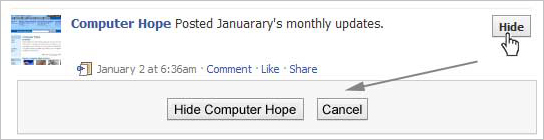
It quickly gets annoying seeing some users posts, game invites, polls, etc. Hovering your mouse to the right of the post and clicking the Hide button as shown below can hide any post. Once this button is pressed you'll be prompted with the option to hide that user or in the case of a Facebook application the option to hide that application from ever showing up on your profile.
Hide Facebook users, games, polls, etc.
To unhide someone or unblock an application click the Edit Options link in the bottom right corner of the news feed as shown below.
Facebook unhide friends
Greasemonkey and FB Purity
Although Facebook does not allow the ability to hide friends getting new friends messages, friends becoming fans of something, and some application messages they can still be hidden with browser add-ons. If you're running Mozilla Firefox, Chrome, Opera, or Safari we suggest installing the Facebook Purity add-on.

Update your privacy settings

Click Account in the top right corner of the Facebook window and then click Privacy settings to adjust who is capable of seeing what on your Facebook profile. We highly recommend going through all the privacy settings to verify your privacy is properly protected.
Anything that is not set to friends only or friends of friends can be seen by anyone searching on the Internet. Below is a few things we recommend for most users.
  1. Under Search in Privacy settings uncheck Public Search Results. This will prevent users from finding your account and profile picture in search results such as Google
  2. Under Application settings, make sure you're only allowing applications you want to have access to your information. Applications that you grant rights to can have access to your Facebook profile information.
  • If you're curious to see how a program or web page connect to the Facebook API can see your profile see Tip135.

Use the Facebook top bar for navigation

Facebook navigation
Knowing how to properly navigate is vital if you want to get the most out of Facebook. Below is a brief description of each of the available options in the top bar as shown above.
Home (facebook logo) - Clicking this logo takes you to your wall (News Feed) that shows all friends recent posts.
Friend requests - If any friend requests are waiting to be approved this icon shows a notification of how many friends are waiting for approval. This icon can also be clicked when you want to view any friend recommendations or search for friends on Facebook.
Messages - This section allows you to send and receive private messages between one or more people you're friends with.
Notifications - Any time a friend or Facebook application creates a new post you'll be notified in this section. Clicking this icon shows all recent notifications. If you want to change what is capable of sending you notifications including any Facebook applications or games click the See All Notifications link at the bottom and check or uncheck what you want to be notified on.
Search - Finally, the search box in Facebook can be a powerful tool that can be used to quickly find any current friends or people on Facebook. In addition searching for terms such as a company name, product, sports team, music band, etc. will find fan pages and groups that can be joined.

Modify your account notifications

Keep your e-mail and your cell phone clean by updating or eliminate Facebook notifications or keep more up-to-date by adding new notifications. Facebook notifications can be added and removed by clicking Account link in the top right corner, then Account Settings, and then clicking the Notifications tab.

Top News and Most Recent

Facebook News and most Recent
By default Facebook displays your wall postings in the News format, which means it only displays posts it believes are most relevant to you. These results are based on your past interaction with your friends. If you want to see every post made by all your friends that are not hidden click the Most recent link in the upper right section of your news feed as shown in the above picture example.
If you want to adjust who shows up manually click the Edit Options in the bottom right corner of your news feed.
Facebook unhide friends

View High School work friends

If you've added your High School or previous Work locations to your profile, quickly see all classmates and co-workers on Facebook by clicking the link in your Info tab under your profile.

Quickly change profile picture

Your profile picture can be quickly changed to any other picture by visiting your profile, hovering the mouse over your current profile picture, and clicking the Change Picture link that appears in the top right corner of the picture.

Don't post private information on friend's walls on in comments

When you make a post on a friend's wall or in any of their comments realize that any of their friends are going to be able to see that post. If you want for something to remain only between you and a friend send them a Facebook message instead.

Suggestions and random friend invites

As you get more friends on Facebook it will begin making friend, groups, and fan suggestions. These are suggestions made by Facebook and not your friends. Unless these are something you're interested in they can be ignored.
This same rule can be applied to people who may want to be your friend that you don't know. If you don't know someone don't accept his or her friend invite. Once someone becomes your friend they'll have access to any information your friends are capable of seeing.

Tag your Facebook friends in your photos

Always make sure to tag any of your Facebook friends that are in pictures you upload. However, never tag someone who is not in the picture. When someone is tagged in a photo that picture is automatically added to that persons profile and is a great way to share pictures with all friends.


RESUME OR CV NEW FORMAT


           CURRICULUM VITAE


NAME
ADRESS
ZIPCODE

                    Email   :
                    Mobile  :

Career Aspiration

A position in a progressive Organization to utilize my educational background and experience to
enhance my career.


Educational Qualifications
 

Personal Details
Name of father
:
Date of birth
:
Nationality
:
Sex
:
Religion
:
Passport Number
:
Driving License 
:
Marital Status
:
Known Languages
:


Certifications
            Ø  For Example
Ø  Computer Hardware & Networking
Ø  Computer Aided Design (Auto CAD)
Ø  Forklift operations

Computer Knowledge

            Ø   Computer Hardware & Networking
            Ø  MS Office
            Ø  Photoshop
            Ø  Auto CAD
Experience
 For Example: I have been working as Hardware & Networking technician in SK Associates Trivandrum, since November 2012.

Nature of Job
Ø  PC Installation Troubleshooting & Upgrading.
Ø  Application Software & O/S Installation.
Ø  Peripherals installations.
Ø  Network installation & troubleshooting.

Declaration
 I hereby declare that all the above mentioned are true and correct to the best of my knowledge,
information and belief.

PLACE                                                                                                               NAME